

Have you ever received a notification from Sken.io about a change, but when you checked the website, everything looked exactly the same?
The price was the same, the text was the same, and the image hadn't changed. You might have thought, "Is this a bug? Why did I get an alert?"
The answer usually lies hidden in the website's code. Websites frequently change their formatting (CSS), spacing (padding), or font styles without changing the actual information. To a human eye, the page looks identical. To a robot monitoring pixels, it looks like a completely new page.
This is exactly why Sken.io offers two distinct monitoring modes when you select an element: Content and Visual. Understanding the difference is the key to stopping false alarms.
The "False Positive" Problem
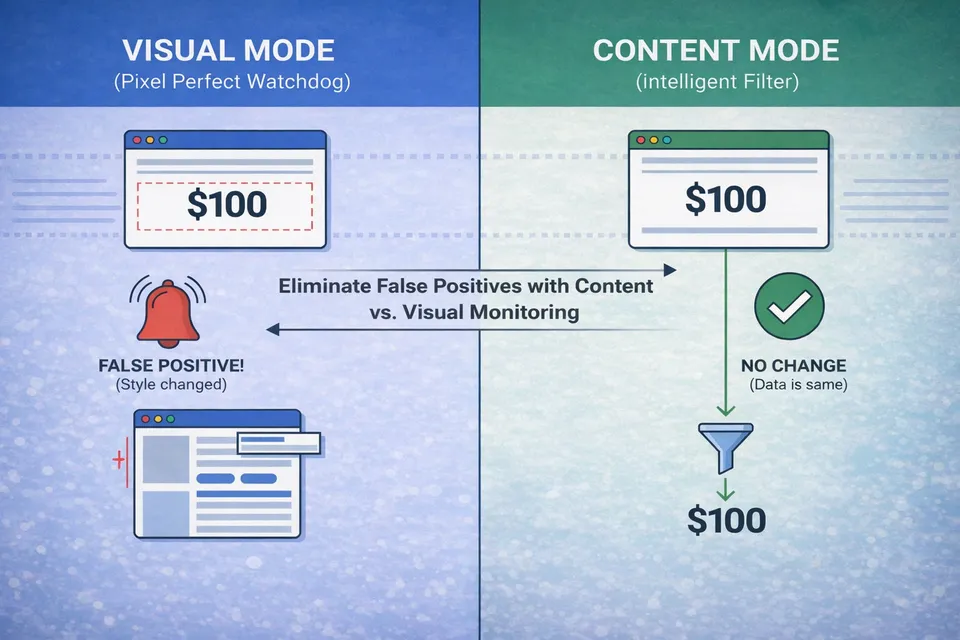
Let’s say you are monitoring a product price that is $100.
The website administrator decides to update the site design. They increase the space between the price and the "Buy" button by 5 pixels, or they change the font color from black to dark grey.
- The Content is the same: It is still "$100".
- The Visuals are different: The pixels have shifted or changed color.
If your monitor is set to strictly watch for visual changes, Sken.io will correctly report a change. However, for you, this is a false positive because the information you care about (the price) hasn't moved.
Visual Mode: The Pixel Perfect Watchdog
When you select Visual mode, Sken.io captures a screenshot of the selected area and compares it to the previous version pixel-by-pixel.
What triggers an alert in Visual mode?
- Changes in text or images.
- Changes in font style, color, or size.
- Changes in padding, margins, or layout alignment.
- Loading of dynamic ads that push content down by a few pixels.
Content Mode: The Intelligent Filter
Content mode is what most users actually need. In this mode, Sken.io ignores the "styling" layer of the website. It extracts the raw text and image sources, strips away the formatting (HTML/CSS), and compares only the data.
What does Content mode ignore?
- Formatting changes (bold, italics, font family).
- Color changes.
- Minor layout shifts or spacing adjustments.
Best used for: Price tracking, out-of-stock alerts, news monitoring, and reading government announcements.
Summary: Which one should I choose?
| If you want to know when... | Choose Mode |
|---|---|
| The price or stock status updates | Content |
| A new article is published | Content |
| The website layout changes or breaks | Visual |
| A visual banner or logo is updated | Visual |
If you feel like you are getting too many notifications for changes you can't see, try switching your job settings to Content mode. It is the easiest way to filter out the noise and focus on the data that matters.